Shot Clock by Dugong Technology

Precision rifle · PRS

A precision rifle timer that already knows your par times.

Par times, warnings you can feel, and your DOPE on the same wrist. Built for shooters who are prone behind a rifle when the clock starts — not standing next to it.

Close-up of a Garmin watch on a shooter's wrist showing 79 seconds remaining, both hands still on the rifle.
Both hands still on the rifle. Seventy-nine seconds left, and he hasn't moved to check it — the wrist told him.

A 90-second stage

Start Time

Warnings you feel rather than watch, so you always know how much stage is left without breaking your cheek weld. Put them wherever you want them — every shooter has their own idea of when they need telling, and this one's yours to set.

Par times to start from:
45s · 60s · 90s · 100s · 120s · 180s · 300s — then change the time, change the warnings, or build the stage from scratch.

What matters behind a rifle

Designed around the position, not the button.

Precision rifle asks something a pistol timer never has to: work perfectly for someone who cannot reach it, cannot look at it, and cannot afford to move.

Or start it without the button

Gesture start is there if you want it — a movement of the arm the watch is already on, so your other hand can stay where it is and you needn't look down to find a button.

Your DOPE on your wrist

Come-ups and windage for every distance, right where you can see them. No card gone soft in the rain, no scrolling a phone with wet hands.

Time Slice

The face fills with colour as the stage runs — green, then blue, then yellow, then red. You don't read it, you catch it in the corner of your eye: red on your wrist means you're nearly out of time. Some shooters live by it, plenty never switch it on.

Fullest on Garmin

Warnings you feel, not hear

Put them where your stage needs them, and each one is a pulse on the wrist. You track the stage by feel, without a sound being made and without looking down. An Apple Watch taps too — Garmin plays the full pattern.

Notes at the bench

The wind call that worked. The prop that cost you two impacts. Written down before you've walked back to the truck and forgotten it.

No phone, no signal, no problem

The Garmin app runs entirely on the watch. Matches are usually a long way from a tower, and it doesn't care.

Wear it however suits you

Plenty of shooters turn the watch so the face reads with their arms out on the gun. Nothing minds — the display and the gesture both work out where they are for themselves.

Match day

No two matches are the same. Neither is your setup.

Pistol disciplines have their times written in a rulebook. Precision rifle doesn't — every match director builds their own stages, and you often don't see the detail until you're standing at the brief. New distances, new par times, a stage that wants a different warning than the last one.

So the setup can't be something you did at home on Thursday. It has to be something you can change in the truck at seven in the morning, on a property with one bar of signal and no data.

Edit on your phone. Push to the watch. No internet.

The companion app talks to your watch directly over Bluetooth — there's no website in the middle and no server to reach. Sit in the truck with no reception at all and you can still:

  • Set today's par times to whatever the match director just announced
  • Move your warnings to suit the stage you're about to shoot
  • Rewrite a DOPE card for the distances actually on the board
  • Reorder your cards so the one you need is the one you land on
  • Write yourself a note about the wind before you walk up

Typing all that on a watch would be miserable. Typing it on your phone takes a minute, and it's on your wrist before you've got your kit out of the back.

Why it works with no signal

Your phone and your watch are already paired to each other over Bluetooth. Shot Clock uses that link directly, so your stages and cards never go near the internet. If you want to build things at home on a big screen the web portal is there too — but you never need it, and you certainly don't need it at a match.

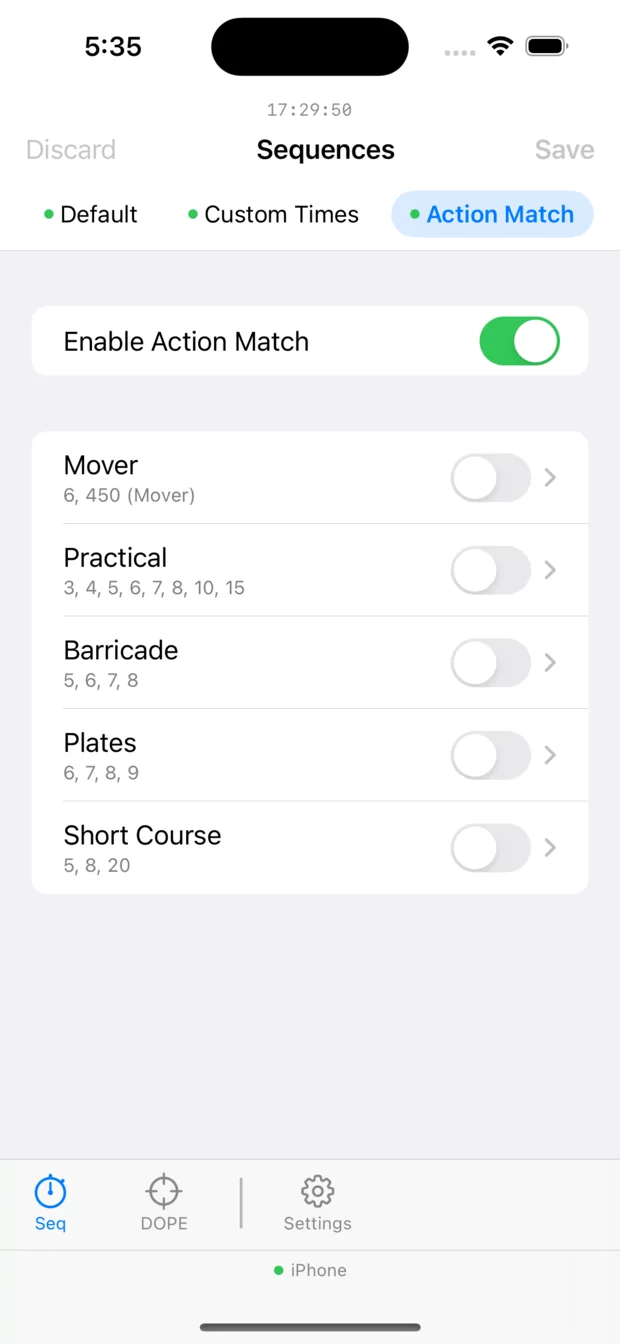
The Shot Clock companion app on an iPhone, showing the Action Match sequence family with Mover, Practical, Barricade, Plates and Short Course and their time strings.
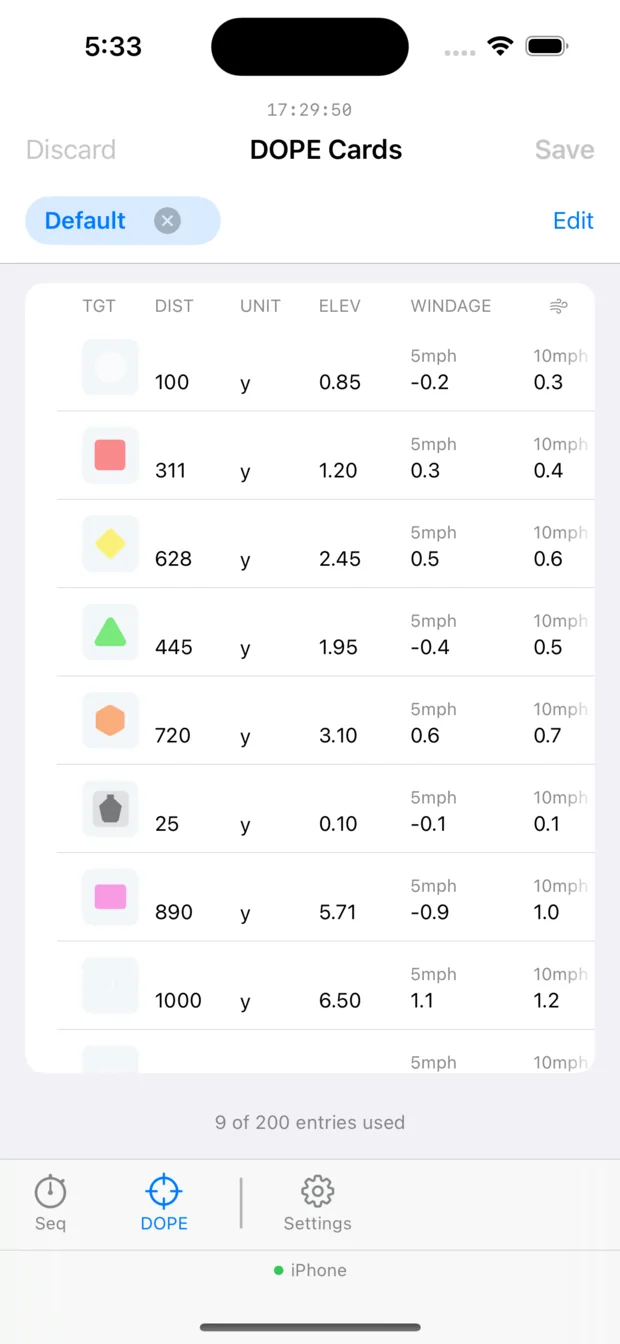
A DOPE card in the Shot Clock companion app on an iPhone: distances from 25 to 1000 yards with elevation and windage at 5mph and 10mph.

Every match ready to switch on, and your DOPE edited on a screen you can actually see.

Built on what shooters tell us

DOPE cards exist because a customer asked. So does the best thing in the app.

This isn't a big company with a roadmap committee. When a shooter says something doesn't work the way it should on the clock, it usually gets fixed in the next version — and quite often that's weeks, not years.

The clearest example is the one you'll use most. Alerts at the transitions a stage actually has are what let a shooter stop looking at the clock at all — and being able to move them yourself, so they fall where your stage needs them, came straight from a customer.

Recent examples, all of them somebody's feedback first:

Tell us what you need

"Put my DOPE on my wrist"

DOPE cards are on the watch because customers asked for them. The feature exists because of shooters — and it's still being sharpened by them, which is why the elevation column is now bold and 25% larger than the rest of the row.

"The buzz lags the press"

The start alert was landing a fraction late, and by a different amount each time. It now fires on the press itself, so the signal is the instant you gave it.

"My watch is too old for this"

Sequence sync used to be limited to newer watches. It now reaches every supported device — sixteen more models, including some quite old ones.

Between matches

The dry-fire session that actually counts.

Set a 90-second par, build your position, and run the stage in the garage. The pressure of the clock is most of what makes a match hard — and it's the part most people never practise.

Add Shot Clock Diary — a separate app — and every one of those sessions becomes a record: what you ran, how it went, what you'd change. Come back in three months and you can see whether the change worked.

See Shot Clock Diary
A DOPE card in the Shot Clock app on an iPhone: distances from 25 to 1000 yards, each with elevation and windage at 5mph and 10mph, and a coloured target marker.

Your come-ups and windage at the distances you actually shoot — on the watch as well as the phone.

Precision rifle questions

Before you download it

How does gesture start actually work?

The button still works, and most people use it. But turn gesture start on and you can begin a stage with a movement of the arm the watch is already on — no second hand reaching across, and no looking down to find a button. Plenty of rifle shooters leave it on for exactly that.

Worth knowing before you rely on it: it can start when you didn't mean it to. Not because it's unreliable — it reads the movement perfectly well — but because it's a movement people sometimes make without thinking. Scratching your head is the classic one. Three sensitivity settings help, and it's a switch you can turn off between stages. Whether that trade is worth it depends on you.

What par times can I set?

45, 60, 90, 100, 120, 180 and 300 seconds are there to start from, but none of it is fixed. Change the par, change where the warnings fall, or build a stage from scratch and save it under your own name.

Can I move the warnings?

Yes, and most people do. The defaults sit at 60, 30, 10 and 5 seconds remaining on a 90-second stage, but every shooter has their own idea of when they want telling. Put them where they're useful to you.

Can I change all this at the match?

That's rather the point — see setting up at the match above. Edit it on your phone in the truck and push it to the watch over Bluetooth. No signal needed.

Can I use it without my phone?

Yes. On Garmin the whole thing runs on the watch. Leave the phone in the truck.

Does it record the stage as an activity?

On Garmin it can, so your stages show up alongside everything else in Connect.