When every second counts
Shot Clock runs your stage on the watch you already wear, or the phone already in your pocket. Your match timings and par times are ready to go — nothing to program before your first string. And on your watch, when your hands are full, a turn of the wrist starts it.

Try it here
Pick a match, press start, and watch the timer run. Or type in your own course of fire and try that instead.
The Shot Clock family
Shooters kept asking for more. This is what it grew into.
The timer. Your match timings and par times, on the watch you already wear or the phone in your pocket.
Garmin · Apple Watch · iPhone · Android
Everything Shot Clock does →The record. Session notes, real score cards, conditions and results that show what's changing over a season.
iPhone · Android · a separate app, with no timer in it
Everything the Diary does →One clock the whole line can see. A spare phone or tablet on the wall, showing the time between details and the countdown during them.
Being tested at ranges now
See what it does →Shot Clock on your watch or phone, turning the targets and sounding the horn wirelessly — with no fob to hold, put down or drop.
Turning real targets at ranges now
See what it does →Shot Clock
A stopwatch never did. Shot Clock knows how your match runs, start to finish — and it will run it at seven on a Tuesday with nobody else at the range.
Practise the stage exactly as it will be called on the day, in the same times you will shoot it in.
Nobody watches a timer with a target in front of them. The alerts tell you where you are — a pulse on the wrist, a tone, or nothing at all where the rules forbid it.
Garmin, Apple Watch, iPhone or Android — the same timer on all four. Use whichever you've got on you.
Already on a Garmin? The phone app is free.
Building a sequence or a DOPE card on a watch screen is miserable. Do it on your iPhone or Android instead — sequences, DOPE cards and notes, on a screen with a keyboard — then send the lot straight to the watch. No subscription, nothing to unlock.
You only pay if you want the phone itself to be the timer.
Shot Clock Diary
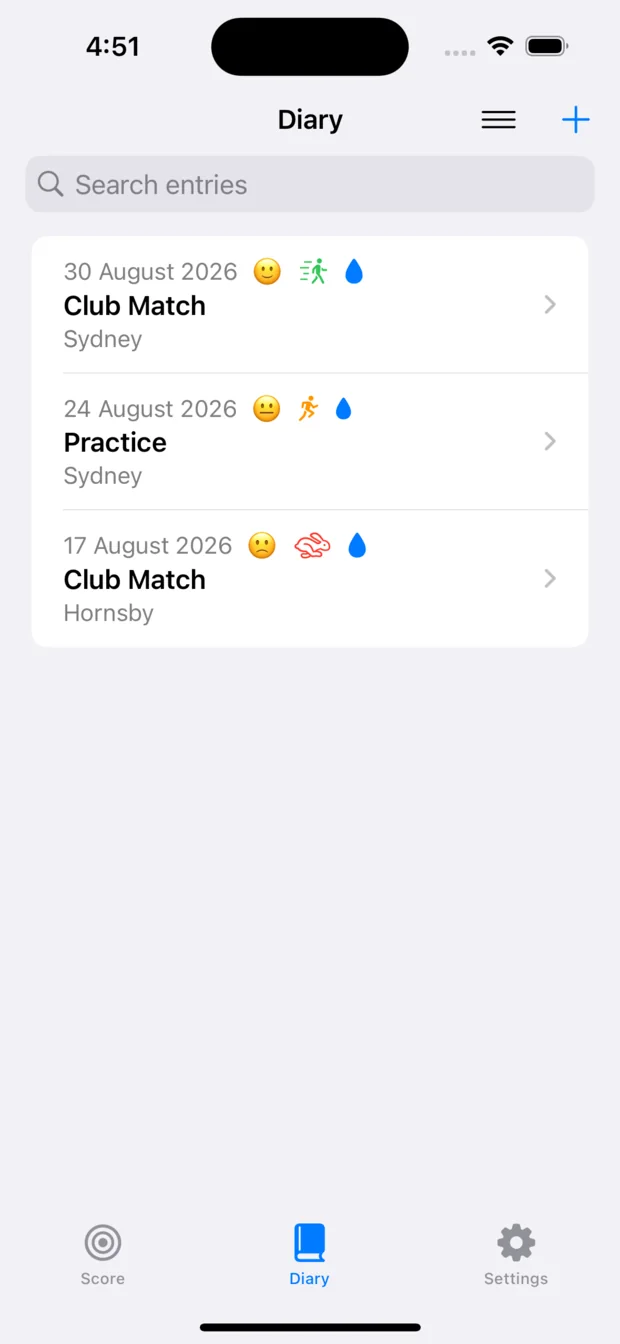
A shooting diary that remembers more than you do — the conditions, the photographs, the sketches and the score card, kept together for every session you shoot.
The load, the conditions, the light, how it felt. Thirty seconds at the bench beats trying to reconstruct it on Wednesday.
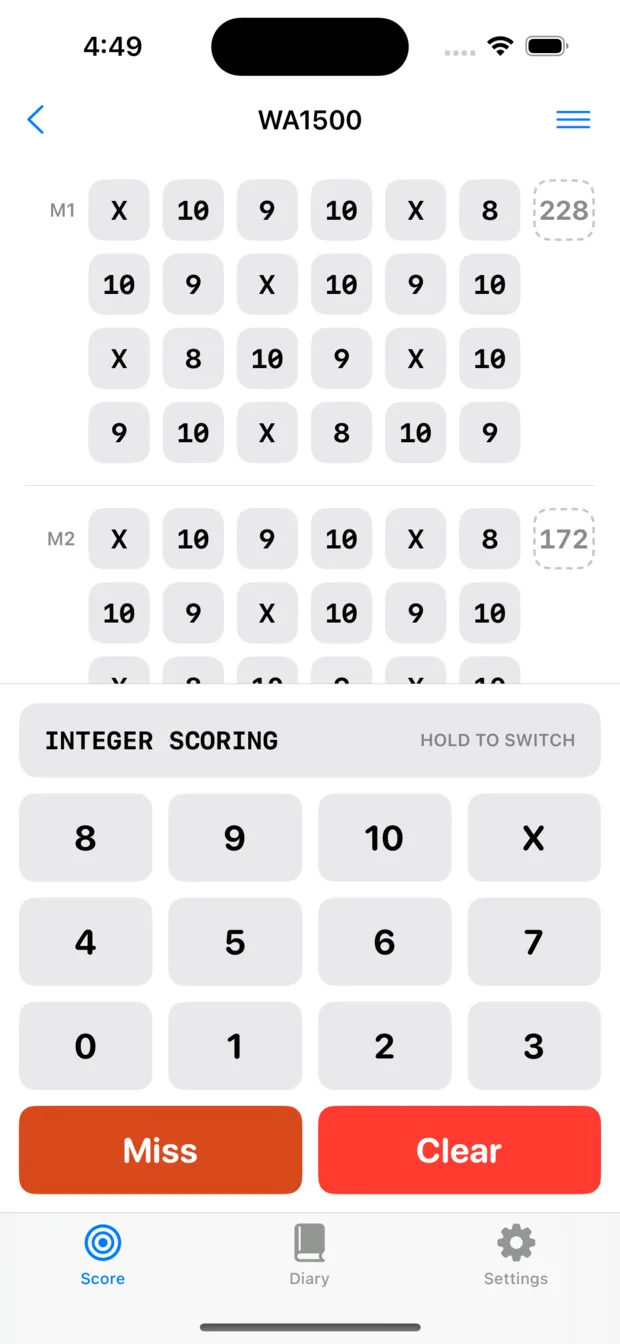
Real score sheets for real disciplines, so what you fill in on the phone is what you'd fill in on paper.
Scores as a line over months. Good weeks and bad weeks stop being a mood and start being information.
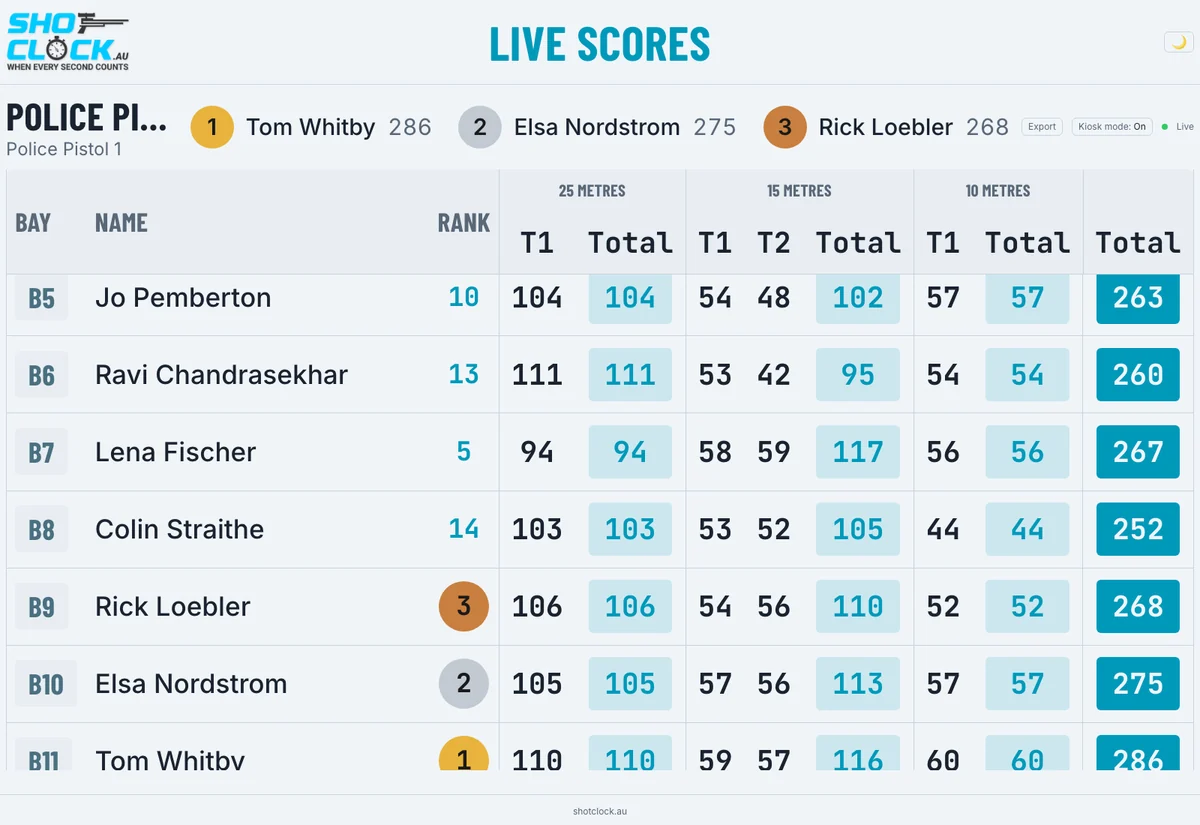
Keep every shooter's card on one screen and hand out results before anyone's packed up — and push the running scores to a display so competitors aren't crowding the scorer's table.
See everything the Diary does

Not just the apps
Two jobs a watch screen is too small for. Both open in a browser on any machine you like.
Included with Shot ClockBuild it on a proper screen, not a watch.
Write your sequences, lay out your DOPE cards and type your notes in a browser with a real keyboard, then send the lot to your watch. Anyone who has tried to enter a course of fire on a 1.4-inch screen already knows why this exists.
Open the menu on your watch, choose Open Portal, and type the six-digit code it shows you. Or have a look around the demo without a watch at all:
Try the Portal demo
Included with Match Official ModePut the scores where everyone can see them.
Score the match on your phone and the standings appear on whatever screen you point at them — a laptop, the clubhouse television, a competitor's own phone. Nobody crowds the scorer, and nobody waits until the end to find out where they came.
It also runs at ranges with no internet at all, from its own small server on the bench. Have a look at a match in progress:
Open the Live Scores demoThe Portal needs a connection: it is for the kitchen table, not the firing point. Live Scores does not — run it from its own server at the range and nothing needs the internet.
Built on what shooters tell us
This isn't a big company with a roadmap committee. Most of what matters in Shot Clock started as feedback from somebody at a range, and the single most important thing in the app arrived exactly that way.
If something about the timer doesn't work the way your discipline actually runs, we'd genuinely like to hear it.
Tell us what you needBefore Shot Clock, this sport ran on general-purpose timers and kitchen timers, and every one of them had the same problem: to find out where you were in the string, you had to look at it.
You cannot afford to look. There's a target in front of you and a sight picture to hold. Every glance down costs you a shot, and it costs you at exactly the moment the clock matters most.
So we put alerts in, spaced at the transitions a match actually has. That was the change. A signal at the right instant tells you where you are without your eyes ever leaving the target — the first timer in this sport that told the shooter, instead of waiting to be read.
Setting those intervals yourself came later, on a customer's suggestion, and it made a good thing fit every discipline. But the alerts are why the watch stays on the wrist instead of going in a drawer.
DOPE cards exist because customers asked for them. The whole feature — come-ups, windage, your own distances — began as a request, and it's still being sharpened by the people using it.
Sequence sync was limited to newer watches. It now reaches every supported device — sixteen more models.
Follow along
New features, what's coming, photos and video from matches, and the occasional look at what we're building next — Facebook is where we post it first.
Designed and built in Australia
Shot Clock is free to try on every platform — thirty days on Garmin, a free trial on iPhone, Apple Watch and Android, and the phone companion stays free for good. Shot Clock Diary is a separate app, on iPhone and Android.
Pick a match below, or write your own stage and watch it run.
Plus Mode is the run-up before a stage — usually set to however long the targets stay turned away, so you can start the timer before match firing commences and the stage comes in exactly as they turn. It's a setting on the watch rather than part of the sequence: 1–15 seconds, set to 7 here so you can see it work. A sequence beginning with # ignores it.
A stage is a list of phases separated by :. Inside a phase, the first number is the time in seconds and anything after a . is a warning, given as seconds remaining.
20.10.3 — 20 seconds, warnings at 10 and 3 left3:-5:3 — 3 seconds, 5 seconds facing away, 3 seconds#90.60.30.10.5 — a 90-second PRS par with four warningsPrefixes — # starts immediately, ignoring your Plus Mode lead-in. ^ forces the count upward for that stage.
A minus sign means you are not shooting during that phase — a load period or a turn-away. The watch shows those in blue, and Time Slice sits them out entirely.
A zero on any phase after the first is a pause: the timer stops and waits for you to press start again.
The rules below are the app's own. If the watch would reject what you type, so will this.